


本文最后更新于2025-06-24,距今已有 480 天,若文章内容或图片链接失效,请留言反馈。
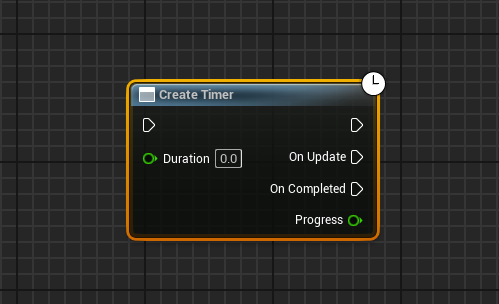
在unity中体会到过异步的好处,想着UE中肯定有实现,搜了搜,蓝鸟图不带,需要自己定义UEC++实现,继承UBlueprintAsyncActionBase 类实现。继承本基类所公开到蓝图的函数,就会携带着异步喊函数特有的右上角小时钟。
参考文章:
基本思路就是,继承UBlueprintAsyncActionBase 类,然后声明多播委托,方便蓝图内执行,蓝图需要传入世界上下文,便于获取TimerManager 。然后在Activate (蓝图会自动调用本函数),根据设置的时间循环调用最终处理函数。处理函数没啥可说的,就是注意结束时要释放TimerManager 句柄和释放自己,避免崩溃。
示例代码:
.h
// Fill out your copyright notice in the Description page of Project Settings.

#pragma once

#include "CoreMinimal.h"
#include "Kismet/BlueprintAsyncActionBase.h"
#include "MyBlueprintAsyncActionBase.generated.h"

/**
 *
 */
DECLARE_DYNAMIC_MULTICAST_DELEGATE_OneParam(FOnTimerUpdate, float, Progress);
DECLARE_DYNAMIC_MULTICAST_DELEGATE(FOnTimerCompleted);


UCLASS()
class TEST_API UMyBlueprintAsyncActionBase : public UBlueprintAsyncActionBase
{
	GENERATED_BODY()
public:
	UPROPERTY(BlueprintAssignable)
	FOnTimerUpdate OnUpdate;

	UPROPERTY(BlueprintAssignable)
	FOnTimerCompleted OnCompleted;

	UFUNCTION(BlueprintCallable, meta = (BlueprintInternalUseOnly = "true", WorldContext = "WorldContextObject"))
	static UMyBlueprintAsyncActionBase* CreateTimer(UObject* WorldContextObject, float Duration);

	virtual void Activate() override;

private:
	UPROPERTY()
	UObject* WorldContextObject;
	/**总共需要的时间*/
	float TimerDuration;
	/**当前用时*/
	float CurrentTime;

	/**定时器执行*/
	void TickTimer();

	// 这里添加计时器句柄声明
	FTimerHandle TimerHandle;
};
.cpp
// Fill out your copyright notice in the Description page of Project Settings.

#include "TimerManager.h"
#include "Engine/World.h"
#include "MyBlueprintAsyncActionBase.h"

UMyBlueprintAsyncActionBase* UMyBlueprintAsyncActionBase::CreateTimer(UObject* WorldContextObject, float Duration)
{
	//创建本实例
	UMyBlueprintAsyncActionBase* Action = NewObject<UMyBlueprintAsyncActionBase>();
	//获取对世界上下文的引用
	Action->WorldContextObject = WorldContextObject;
	//限制时间不菲小于1s
	Action->TimerDuration = FMath::Max(Duration, 1);
	return Action;
}
//本函数蓝图会自动执行调用
void UMyBlueprintAsyncActionBase::Activate()
{
	CurrentTime = 0.0f;

	if (UWorld* World = GEngine->GetWorldFromContextObject(WorldContextObject, EGetWorldErrorMode::LogAndReturnNull))
	{
		FTimerManager& TimerManager = World->GetTimerManager();
		TimerManager.SetTimer(TimerHandle, this, &UMyBlueprintAsyncActionBase::TickTimer, 0.016f, true);
	}
}
//时间manager会根据设置间隔时间调用
void UMyBlueprintAsyncActionBase::TickTimer()
{
	//先设置本次调用时的时间
	CurrentTime += 0.016f;
    //判断是否达到要求时间
	if (CurrentTime >= TimerDuration)
	{
		//设置相同时间
		CurrentTime = TimerDuration;
        //获取时间时间管理器,使用之前获取的句柄,释放本循环
		if (UWorld* World = GEngine->GetWorldFromContextObject(WorldContextObject, EGetWorldErrorMode::LogAndReturnNull))
		{
			World->GetTimerManager().ClearTimer(TimerHandle);
		}
        //最后一次调用更新和调用结束委托
		OnUpdate.Broadcast(1.0f);
		OnCompleted.Broadcast();
		//调用父类函数销毁自身
		SetReadyToDestroy();
	}
	else
	{
		//没有达到则调用多播委托
		OnUpdate.Broadcast(CurrentTime / TimerDuration);
	}
}    // Fill out your copyright notice in the Description page of Project Settings.
UE通过C++实现异步函数
https://blog.rsjwy.com/archives/unreal-async
评论